
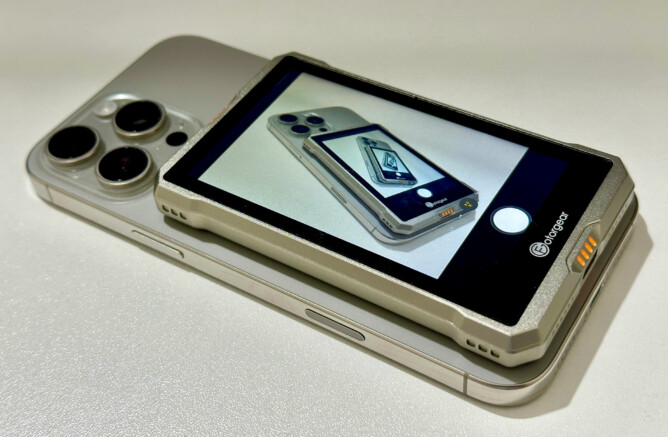
Allow me to introduce a gadget that I did not know I need until I learned that it exists. Fotorgear MS01 is a small device with a 3.97″ screen and can receive screen mirroring from a smartphone. Why would anyone wants to mirror phone screen to an external gadget that is even smaller than the phone’s screen size? The answer is simple: for taking better selfies.
Every modern smartphone has front camera and back camera. It is generally well known for almost every brand that the back camera is better than front camera. Some high end smartphones even have multiple lenses at the back, with much better specifications than the selfie camera at the front. When we take selfies using a stick, we need to use the front camera because we need to see if the phone is properly positioned so that we appear as expected in the photo. We need to see the phone screen, hence we are limited to using the front camera.
With Fotorgear MS01, we can attach this tiny screen at the back of a smartphone and we can see the camera app while using the back camera. We finally get to take selfies with the better cameras of our phones.
To be fair, there are other product offering similar functionality. I like Fotorgear MS01 because it can be attached to the back of my iPhone using Magsafe magnet. The size is just right that I can basically use any normal selfie stick, no need to buy new one. There is one catch though, Fotorgear MS01 weighs 142 gr, so the total weight of our phone plus MS01 would be significantly heavier for one-handed selfie stick.
On iPhone, screen mirroring is achieved by connecting our phone to the screen’s WiFi signal, then choose Screen Mirroring button from the Control Centre. That’s it. Simple and works like a charm, in theory. In reality, sometimes I need to turn my phone’s WiFi off and on again before I can see the Fotorgear device in WiFi list. Not a big deal, but it does add time when the user needs fast screen mirroring during holiday or sport event. Yes I can always connect it early before I need it. But since this tiny screen is not the lightest, having it attached to my phone all the time does make it too heavy. In addition, keeping the connection for whole day is not an option because Fotorgear MS01 is battery-powered. According to Fotorgear, screen mirroring will also work with Android phone, but I have not tried.
Once connected, Fotorgear MS01 screen will show whatever in my iPhone screen. It would allow me to use my phone’s back camera with better quality to take selfies or wefies.
I had to remind myself a few times that the Fotorgear MS01’s screen is not touch screen. We cannot tap the camera button on that screen, no matter how tempting it is to do so. We still need to flip our phone to open Camera app, but we can use the Volume Up button to trigger the photo, or use one of those remote shutters that often come with selfie sticks.
Another minor concern is that I noticed some buzzing sound coming from Fotorgear MS01 when connected to a phone. Most people will not hear the sound when using this tiny screen outdoor (probably the most common location to use it), but the sound is easily noticeable during indoor use. I suspect that sound might come from some cooling fan mechanism.
Definitely a useful little gadget. Not perfect, but I could get some good use of it from first we weeks of use. If you take a lot of selfies, this is an accessory to consider.
Leave A Comment