
I started using Mac mini as my personal computer since 2009. I got frustrated that I had to do a format-and-reinstall my Windows machine every a few years back then, so I tried Mac and never looked back. For many years, I got used to using Mac for home and Windows for work. In the first couple of years, I had to change my keyboard setting in my Mac because I could not get used to pressing Cmd button instead of Ctrl. After years, I learned to adjust my fingers. Nowadays my fingers would automatically adjust between Cmd and Ctrl without the need to remap keyboard from Mac settings.
My current work allow me to choose my work laptop, and I did choose Windows for my first 2 machines. The first one was Dell, then Lenovo. They are both capable laptops, but both had the same two major issues: battery life and temperature. Battery life is a not a big issue when I work from home, but it becomes an issue when I need to work anywhere else, such as full day in-person workshop, or working from locations other than home or office when life happens.
The second issue, temperature, was actually the bigger problem. Even a simple video call with Microsoft Teams would sometimes caused my laptop to run so hot, and the cooling fan would work extra, sounding like a rocket engine. Ok, that rocket engine thing is an exaggeration, but you get what I meant. On top of being annoyingly loud, when temperature goes up, the laptop will start to slow down and act sluggish. This became a major blocker when I needed to get things done quick.
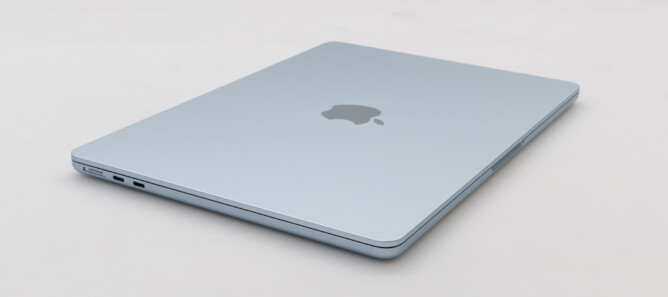
When it was time for me to choose my next laptop few months ago, I finally decided on Macbook for my new work machine. I chose Macbook Air because I always prefer lighter machine and Macbook Pro is noticeably heavier. I did have concern with the limited ports in Macbook Air, but I was hopeful that a proper USB-C hub should be able to resolve it.
Initial set up was not hard. Most apps I need are from Microsoft and I can easily get the Mac version of those. I needed some help from my colleague to set up my Visual Studio Code to connect to our repo, but that’s about it. For the first time in years, I do not hear those loud fan noise during Teams call, and my laptop temperature never went up to the point of concern. There are still some strange quirks from Microsoft Teams from time to time, but that’s because my company policy puts me in the group of people that gets TAP version (Technology Adoption Program, basically I always get the Beta version of Teams).
Battery life was impressive so far. My previous Dell could not even survive half day workshop without charging, my new Macbook Air 13″ with M4 processor can easily survived more than 4 hours doing Microsoft Teams call without charging.
M4 processor is more than capable to handle everything I need to do for work so far. Every day work is generally smooth. I need to restart the laptop once a week or so, or some of the Microsoft apps will start becoming unstable. That’s a minor inconvenience I am happy to live with.
32GB RAM does help with my habit of opening many browser tabs. At any given time, I usually have somewhere between 20 to 100 open tabs and I have not experienced any significant issue so far.
13″ screen is a bit small, but it is a minor thing because I use my laptop with 2 external monitors and my eyes are on the 28″ external monitors most of the time. Turns out, I cannot have my Mac extending to 2 external displays using the same USB ports. So I have to utilise both USB-C ports, achievable by some changes in my USB-C hub strategies.
Now that both my personal and work computers are Macs, I get to enjoy some fancy integrations. My mouse can move from one computer to another without having to switch the connection at the bottom of my Logitech MX Master 3. I could even set up iPad as an additional screen. I have the option to copy-paste text from one computer to another, and I can use AirDrop to copy files when needed.
The speakers of Macbook Air 13″ M4 are quite capable for doing Teams conference in a small meeting room. Of course I had to remember to turn off noise isolation feature from Ms Teams or it won’t pick up my colleagues’ voices. Its built in camera delivers reasonable quality for video calls, nothing to complain about.
Last but not least: price. Macbook has the reputation of being expensive high-end laptop. However, if we actually compare the price of a Macbook with a Windows laptop that deliver similar everyday user experience, Macbook is actually cheaper than most of comparable Windows laptops. Note that I do not compare equal specs here because macOS delivers better and smoother everyday performance with technical specs that could look less on paper.
Do I recommend Macbook for work machine? It depends on what apps do you need for work. Note that not all Windows apps are available for Macs. A colleague of mine runs a virtual machine inside his Macbook so that he can run some of the tools he can only get in Windows and he seems to be fine, but I do not personally tested this.
Leave A Comment